Database advisor for Enscale
Keep MariaDB tuned as your workload changes, without a full‑time DBA
If you run MariaDB on Enscale and do the database work yourself, on top of running the business, Releem watches the database so you do not have to. It runs inside your Enscale environment, tells you where your configuration has fallen behind your workload, and gives you specific changes to make. You review each one and apply it yourself.
Releem closes the gap
$39 per database node, per month (approx. £29), billed hourly. Available to every Enscale customer.

Who it's for
Built for the person running the database and the business
Releem is for owner-operators and small teams on Enscale who keep MariaDB running themselves, without a dedicated DBA. If tuning the database is one more job on an already long list, this is the second pair of eyes that does the watching for you.
- You set the database up yourself, and it has mostly looked after itself since
- Performance questions land on you, in the gaps between everything else you do
- You want the database kept in tune without hiring a DBA or becoming one
Why it slows down
Why a database that was fine on day one slows down
When you first set up a MariaDB node, the configuration matches the workload in front of you. Memory allocation, buffer pool size, connection limits: all sensible for the data and traffic you had then.
Then the workload moves on. The dataset grows. Someone adds a reporting feature. Traffic gets less predictable. Concurrency creeps up. None of that touches your configuration, so the gap between how the database is set up and how it is actually used gets a little wider each month.
The gap widens
You feel it before you can name it:
- Reports that used to be instant now make you wait
- Admin pages slow down at your busiest times
- CPU spikes at moments that used to be quiet
- Queries that once used an index start scanning whole tables
Individually, none of these looks like a fault. Together, they are your database telling you it is no longer configured for the job it is doing.
Scaling is not a fix
Adding cloudlets buys time, not a fix
Scaling on Enscale is easy, so the natural reaction is to add resources when things get slow. It works, for a while. Then the same symptoms come back, because more memory and CPU do not realign a configuration with a workload. They just give the misalignment more room to hide.
The loop that costs you
- Investigate
- Patch
- Add cloudlets
- Repeat
Here is the part that stings: every cloudlet you add is money, and you are spending it to hide the problem rather than fix it.
A real example
One query was using 29.9% CPU
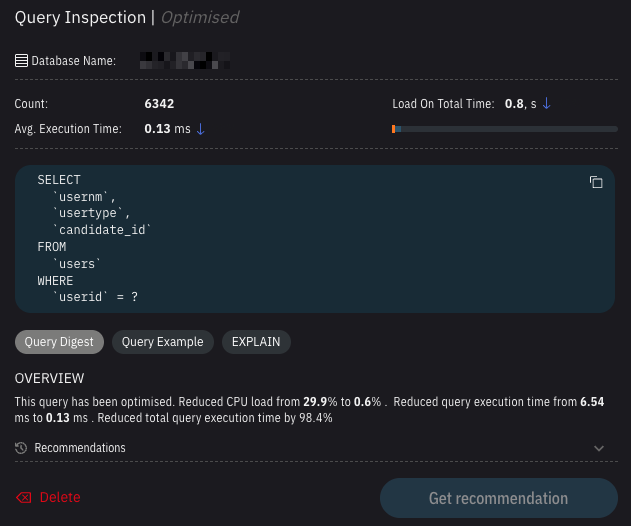
It was a short SELECT on a users table. No errors, no complaints, nothing that made it look like a problem.
After it was optimised, CPU usage dropped to 0.6% and query time fell from 6.54ms to 0.13ms, around 50 times faster. Saving 6ms sounds like nothing until you multiply it by the 6,342 times that query had run.
The benefit is that nearly a third of the node's CPU is now free for everything else. That is more headroom at your busiest times, and possibly one less cloudlet to pay for.
Most people do not have time to review every query, especially when nothing appears to be wrong. Releem does that work continuously, and finds the ones using more resources than they should.
What it actually does
What Releem actually does
Releem runs as an add-on inside your Enscale environment and turns MariaDB performance tuning into something that happens continuously, based on how your database behaves in the real world rather than how it behaved the day it was deployed. It watches the things that quietly decide how fast your database feels:
- Memory use, buffer pool behaviour, and how often you are reading from disk instead of memory
- Query activity, including the inefficient patterns that quietly cost the most
- Connection behaviour and contention
- Configuration values that no longer match the data you are actually using
- The setting
- innodb_buffer_pool_size
- The change
- 2G6G
- The reason
- Your working set no longer fits in memory, so reads are coming off disk during your busiest periods.
A worked example of the three things every recommendation gives you. It is an illustration, not a picture of the dashboard.
When it finds a gap, it gives you a specific, plain recommendation: this setting, changed to this, for this reason. You review it, and you decide whether to apply it.
Not an LLM
Trained machine learning, not a plausible guess
Releem runs on trained machine learning, not a large language model, so its recommendations come from patterns in how databases really behave rather than from predicted text that merely sounds right.
It sharpens as it goes, too. Every recommendation it makes, and every one you apply, teaches it more about your database and your workload. And it does not sit and wait for something to break: when there is room to run faster or leaner while everything is fine, it will say so.
Staying in control
You decide what happens to your database
Whatever Releem recommends, three things you can count on:
Applying a change is your call
Releem recommends the fix and tells you why; you read it and apply it in a click, in the dashboard or with your own database tools. Manual review is the default, and it is how we recommend running it. If you later decide you want Releem applying routine changes for you, that is your call to make.
Your data stays in your database
The agent runs on your own node inside Enscale and reads performance metrics, configuration values and query statistics. It never reads the contents of your tables, and it needs no inbound firewall ports opened.
Configuration changes are reversible
Tuning changes are not one-way. If a recommendation does not do what you expected, roll back to your previous working configuration and you are where you started.
And you are not on your own with any of it. Releem is an add-on we provide as your host, so if a recommendation leaves you unsure, you raise a ticket with the Layershift support team like you would for anything else on your account.
What you get out of it
When the configuration keeps pace with the workload
Your day-to-day improves in ways you can measure:
Lower CPU during your peak periods
Memory holding your working data instead of sitting idle
Fewer cloudlet expansions you did not want to pay for
Query times that stay steady as you grow
And you do not have to take it on trust
Releem keeps a record of your configuration before and after each change, so you can compare the two and see what a change actually did rather than assuming it helped. If the numbers do not move the way you expected, you have the evidence in front of you and a way back.
The word for all of that is
predictable
You stop being surprised by your own database, and you stop finding out that something has slowed down from a customer who noticed before you did.
Install & pricing
Install Releem on your Enscale node
The fastest way is to open Releem in your Enscale account and install it in a single click. Prefer to do it manually? Releem installs directly on your database node from inside Enscale.
Doing it manually: six steps, from inside Enscale
- Open your Enscale environment
- Select your database node
- Click the database service
- Open the Add-ons tab
- Find Releem
- Click Install
Once it is installed, Releem starts analysing how your database is being used and surfaces its first recommendations from your real workload. What happens to those recommendations is your call.
Trying it is cheap. Enscale bills add-ons by the hour, so a full month comes to $39 and anything less costs proportionally less. Install it, give it a fortnight, and if it has not found anything worth having, remove it from the Add-ons tab. You pay for the hours it ran and nothing more.
Still have questions? Fill in a short form and we will arrange a call to answer them.
Book a call with our teamFrequently asked questions
Questions, answered
Pick the area you are weighing up, or just scan the lot. Most questions land on how it works, how much control you keep, what happens to your data, and what it costs.
Do I still have to tune MariaDB myself if I run Releem?
You decide on the changes, but you stop hunting for them. Releem tells you what to adjust and why, across configuration and query behaviour, and you can either apply a fix yourself or accept it in the dashboard and let Releem apply it. Either way the guesswork goes away, and even if you are confident in your own tuning, it keeps checking anyway, and it does tend to surface things people were sure they had already handled.
How is this different from the monitoring I already have?
Monitoring tells you what is happening. It shows you CPU, memory and load, and then leaves you to work out what to do about it, which is the hard part if databases are not your day job. Releem starts where that ends: it turns the same kind of signals into a specific instruction, this setting changed to this, for this reason. It is not a replacement for your monitoring. It is the part that was missing after it.
Is Releem AI? Does it use ChatGPT or an LLM to tune my database?
No, and the distinction is worth understanding. Releem runs on trained machine learning, not a large language model. It does not predict text or invent an answer that merely sounds right, which is exactly how general AI tools can go wrong. Its recommendations come from patterns in real database behaviour, and they get more tailored to your setup the longer it runs.
Will adding CPU or memory just fix this instead?
Not for long. Scaling relieves the pressure, but if the configuration does not match the workload, the same symptoms return as you grow. Releem closes the gap that scaling only papers over.
How do I know if my MariaDB database has drifted out of alignment?
The usual signs: queries getting slower without being changed, CPU climbing during peaks, more reads coming off disk than memory, and performance that feels less predictable under load.
Does Releem change my database automatically?
By default, no. You review each recommendation and apply it yourself, and manual review is how we recommend running it. If you would rather Releem applied routine changes for you, that is available too, and turning it on is your decision.
What if I apply a change and it makes things worse?
You roll it back. Configuration changes are reversible, so a change you are not happy with is not something you have to live with or unpick by hand. Releem also keeps a record of your configuration before and after each change, so you can compare the two and judge the result on evidence rather than on how it feels. One thing worth knowing in advance: some configuration changes need the database to restart, and performance can dip for a few minutes afterwards while caches warm back up. That is normal and passes on its own.
Will the agent slow my database down?
It is built to stay out of the way. The agent is a small program that samples metrics roughly once a minute; it does not sit in the path of your queries, so it is not adding work to the thing you are trying to speed up. It is the same agent Releem runs everywhere else, not a special build for Enscale.
Does Releem send my database data anywhere?
The contents of your tables are never read and never leave your server. What does go to your Releem dashboard, over an encrypted connection, is performance information about the database, set out in detail below. That is what the dashboard displays and what the recommendations are built from. The agent itself is open source, runs on your own node inside Enscale, and needs no inbound firewall ports opened.
What exactly does the Releem agent collect?
Enough to judge how the database is performing, and nothing from inside your tables.
What it collects
- Server performance metrics: memory, CPU and disk use
- Your MariaDB configuration values, so it can see what is set and what it would change
- The names of your schemas and tables, so a recommendation can point at the right one
- Query statistics: how often queries run, how long they take, and how much work they do
What it does not collect
- The contents of your tables
- Anything your own customers would recognise as their data
That information goes to your Releem dashboard over an encrypted connection, which is what lets the dashboard show you a recommendation and explain the reasoning behind it. The agent is open source, so the collection is not something you have to take on faith.
Which databases does Releem support on Enscale?
MariaDB, MySQL Community Edition, and Percona.
How much does Releem cost on Enscale?
$39 per database node, per month (approx. £29), billed hourly, available to any Enscale customer.
Is the price per database or per server?
Per server. Releem is priced per database node, so however many databases you are running on that node, it is still $39 a month. If you run more than one node, it is $39 for each node you put Releem on, and you do not have to cover them all at once. Start with the node that is giving you trouble and add the others later if it earns its place.
Who do I contact if I have a question about a recommendation?
Us. Releem is an add-on we provide as your host, so anything to do with it, including a recommendation you are not sure about, goes to the Layershift support team in the usual way. You are not opening a second support relationship with another vendor.
How soon will I see results after installing Releem?
Releem starts analysing straight after install, so its advice comes from your real usage rather than a generic template. Configuration recommendations come out of that first pass. The query and index side builds over the first day or two, once it has seen enough of your normal traffic to know what normal looks like for you.
Keep reading